College in the High School
Application and Enrollment Process
Skagit Valley College partners with high schools to help students earn college credit
through College in the High School (CHS). A Skagit Valley College representative may
visit eligible classes to support students with the application and enrollment process.
High school teachers will also notify and remind students of important enrollment
dates and deadlines.
The steps below outline how students apply and enroll for CHS college credit.
1. Apply
Apply online through the Online Admissions Application Portal (OAAP).
Use your personal email address, not your high school email address.
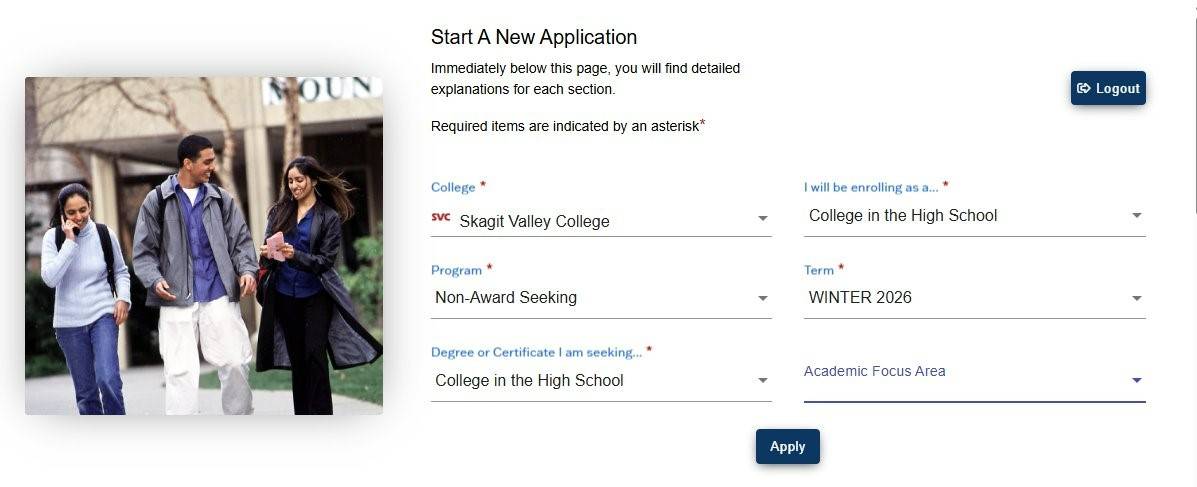
After creating an account, log back in and select Start a New Application. Follow the prompts and make the required selections, then complete all required questions (marked with a red asterisk). Be sure to click Submit at the end of the application.
- College: Skagit Valley College
- I will be enrolling as: College in the High School
- Program: Non-Award Seeking
- Term: Winter 2026
- Degree or Certificate I am seeking: College in the High School
- Academic Focus Area: don't select anything, leave blank
Within a few days, you will receive a welcome email with your ctcLink number, which is your college student ID.
If you do not receive your ctcLink number:
-
Check your spam or junk email folders.
-
If you still cannot find it, email enrollment@skagit.edu for assistance.
Once you have your ctcLink number, you are ready for Step 2.
2. Activate Your ctcLink Account
After your application is processed, you will receive an email with your ctcLink number. This number is required to activate your ctcLink account.
Follow the instructions to activate your account at:
https://shorturl.at/pCHO9
You must activate your ctcLink account before you can register for CHS classes.
3. Enroll to Receive College Credit
Enrollment for first-semester and yearlong CHS courses opens in November.
The Skagit Valley College Dual Credit team provides course codes and registration instructions to CHS high school partners. Check with your CHS teacher for specific instructions on how to register for your CHS class through ctcLink.
If you run into a problem enrolling in your classes, please fill out the form below.
A Dual Credit staff will get in contact with you to assist with the next steps.Need Help?